Showing posts with label Software Tips. Show all posts

Monday, October 31, 2011

WirelessKeyView - Recover Lost Wireless Network Key


WirelessKeyView recovers all wireless network keys (WEP/WPA) stored in your computer by the 'Wireless Zero Configuration' service of Windows XP or by the 'WLAN AutoConfig' service of Windows Vista. It allows you to easily save all keys to text/html/xml file, or copy a single key to the clipboard.

Works on Windows XP, Vista and Windows 7.
Using WirelessKeyView

WirelessKeyView doesn't require any installation process or additional DLL files. Just copy the executable file (WirelessKeyView.exe) to any folder you like, and run it. After you run it, the main window should displayed all WEP/WPA keys stored in your computer by Windows 'Wireless Zero Configuration' service.
For WEP keys, the key is also displayed in Ascii form. Be aware that this utility can only reveal the network keys stored by Windows operating system. It cannot recover network keys stored by any other third-party

System Requirements

* Windows OS with SP1 or greater.
* You must login to windows with admin user.

Known Problems

False Alert Problems: Some Antivirus programs detect WirelessKeyView
utility as infected with Trojan/Virus. Click here to read more about
false alerts in Antivirus programs.

Also, if you have any problem with using WirelessKeyView, please read the
WirelessKeyView Frequently Asked Questions page

Download WirelessKeyView


Sunday, October 23, 2011

Increase your Direct Download speed by up to 500%


Internet Download Manager (IDM) is a tool to increase download speeds by up to 500%, resume and schedule downloads. Comprehensive error recovery and resume capability will restart broken or interrupted downloads due to lost connections, network problems, computer shutdowns, or unexpected power outages. Simple graphic user interface makes IDM user friendly and easy to use. Internet Download Manager has a smart download logic accelerator that features intelligent dynamic file segmentation and safe multipart downloading technology to accelerate your downloads.

Internet Download Manager has a smart download logic accelerator that features intelligent dynamic file segmentation and safe multipart downloading technology to accelerate your downloads. Unlike other download managers and accelerators Internet Download Manager segments downloaded files dynamically during download process and reuses available connections without additional connect and login stages to achieve best acceleration performance.

How it works?
  • It it same as downloading a file in utorrent/bittorent, but in IDM you directly download a file.
  • It accelerates your direct download speed by up to 5x, look at the screenshots below.
  • It can pause and resume when downloading a file, but downloading a game cannot be paused and has no resume capability.
What is the difference between downloading a torrent and downloading a file directly on the net?
  • With direct download, it is more faster than downloading a file in a torrent.
Screenshot:


From 90kpbs to 294kbps while directly downloading a movie..


Now its your turn. Click the link above to download IDM. It is very helpful when you are in a rush of downloading something for your project or other things. Enjoy!

Installation Instructions:
Step 1: Install the program
Step 2: Restart your PC if asked
Step 3: Make sure 'Internet Download Manager' is NOT running
Step 4: copy cracked file in to install dir
Step 5: Run 'Internet Download Manager'
Step 6: Use the serialkey.txt to register


Saturday, October 8, 2011

Tips on How to get your Max Download Speed (uTorrent)


1. Increase Your uTorrent Download Speed! Follow these steps:
  • Torrent Client > Preferences > Bandwidth > Number of connections > Set aprox. 500 for each
  • Torrent Client > Preferences > BiTorrent > Protocol Encryption > Forced
  • Bandwidth Allocation - High (Set download/upload limit - Unlimited)
  • Stop Other Active Torrents - Start downloading and wait for connections.
2. Close Streaming Videos or Musics

3. Try uTorrent Turbo Accelerator

What is uTorrent Turbo Accelerator?

uTorrent Turbo Accelerator is a newly added software in the family of the popular p2p client uTorrent plug-ins. The highly developed architecture behind this app allows you to download movies, music, games and other files you want at the highest possible speed. With uTorrent Turbo Accelerator not only the bandwidth of your Internet connection is managed noticeably with more efficiency but you will have the advantage of locating more sources to download from. 

Installation:


1. Unzip the file after download
2. Find setup and serial inside
3. Run utorrentturboaccelerator_installer and install
4. Run the program after installation *Do not update to the latest version*
5. Register the program with the serial key located at the downloaded folder (serial.txt)

After that click "Run Torrent" and now your uTorrent download speed is boosted!


.


Saturday, October 1, 2011

How To: Remove/Disable WAT Update on Windows 7


If you don’t activate Windows 7 within 30 days after installation, you will not be able to use every feature of Windows. You can regain full use of your computer by activating Windows.

To activate Windows 7 LEGALLY on your computer, do the following:

Open Windows Activation by clicking the Start button, right-clicking Computer, clicking Properties, and then clicking Activate Windows now.‌ If you are prompted for an administrator password or confirmation, type the password or provide confirmation. If you want to activate it legally, just buy a original copy of Windows 7 to save your problem

BUT

If you want it to do the other way around so it won't cause you a lot of dollars, here is what you need to do! :)

This is the easiest solution for your problem of removing the WAT update in Windows 7. Just follow the instructions below.

INSTALLATION INSTRCUTIONS:

1. Download the WAT Remover here.

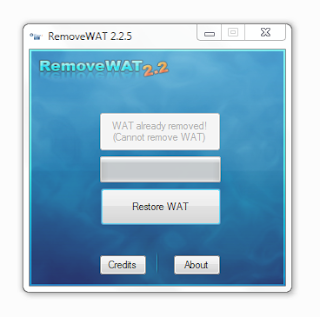
2. Run the crack as administrator. (In my case, it is already removed. I just show you how it looked like)
 3. Click on remove WAT.

4. After that a message will prompt that the system will be rebooting

5. Right Click the MyComputer icon on your computer and the WAT is now removed. See it for yourself!


Thursday, September 29, 2011

How To: Remove Windows Genuine Advantage (WGA) Notification


Windows Genuine Advantage (WGA) notifications pops-up when your computer did not passed the validation test. The validation test can be failed due to a (non-genuine) pirated copy of Windows XP. 


Sometimes you want your computer to be always up-to-date so you click the balloon on the bottom-right of your screen (the red shield-shape icon with an X on it) and change the Automatic Update settings to "Automatic (recommended)" which is wrong! You should turn off Automatic Update for it allows Windows to get updates from Mircrosoft and then the server detected that you have a pirated copy of Windows XP, so the balloon pops-up automatically every time you log on to your computer. You need to get rid of this problem as it can cause your computer to hang and shutdown randomly.


Okay here's what you need to do:

  •  Download Windows XP Crack here.
  •  Extract the .RAR file and Instal!
  •  Instructions are included in the folder (How To.txt)


Design by Free WordPress Themes | Bloggerized by Lasantha - Premium Blogger Themes | JCpenney Printable Coupons