Saturday, October 01, 2011
 kiben
kiben
 If you don’t activate Windows 7 within 30 days after installation, you will not be able to use every feature of Windows. You can regain full use of your computer by activating Windows.
To activate Windows 7 LEGALLY on your computer, do the following:
Open Windows Activation by clicking the Start button, right-clicking Computer, clicking Properties, and then clicking Activate Windows now. If you are prompted for an administrator password or confirmation, type the password or provide confirmation. If you want to activate it legally, just buy a original copy of Windows 7 to save your problem
BUT
If you want it to do the other way around so it won't cause you a lot of dollars, here is what you need to do! :)
This is the easiest solution for your problem of removing the WAT update in Windows 7. Just follow the instructions below.
INSTALLATION INSTRCUTIONS:
1. Download the WAT Remover here.
2. Run the crack as administrator. (In my case, it is already removed. I just show you how it looked like)
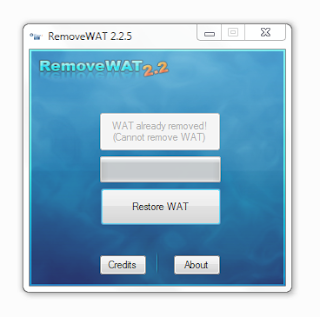
3. Click on remove WAT.
4. After that a message will prompt that the system will be rebooting
5. Right Click the MyComputer icon on your computer and the WAT is now removed. See it for yourself!